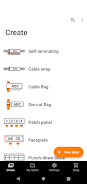
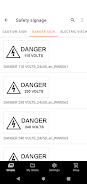
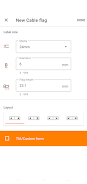
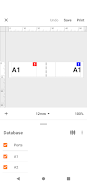
The Brother Pro Label Tool app is a free and easy-to-use labeling software designed for creating professional-quality labels for telecom, datacom, and electrical identifications. With this app, users can easily print labels from their mobile devices to a Brother label printer using a Wi-Fi network. Key features include automatically downloading label templates from Brother's cloud server, easy label selection, editing and printing, powerful print preview, and the ability to create label designs with P-touch Editor and share them via email. Users can also connect the app to a CSV database to create multiple serialized labels and use the Custom Form function to create labels with standardized network address information. Compatible with PT-E550W, PT-P750W, PT-D800W, PT-P900W, and PT-P950NW machines. Download now to enjoy convenient label printing on the go.
Introducing the Brother Pro Label Tool App, the successor to the Mobile Cable Label Tool. This free app is designed for creating labels for telecom, datacom, and electrical identifications. With this app, you can easily print labels from your mobile device to a Brother label printer using a Wi-Fi network. Here are 6 key features of the app:
- Automated label template downloads: The app automatically downloads label templates from Brother's cloud server, ensuring that you always have the latest templates at your disposal.
- User-friendly interface: With just a few taps, you can select, edit, and print professional-quality labels. The app is easy to use, even for those unfamiliar with label printing.
- No need for a computer or printer driver: The app eliminates the need for a computer or printer driver, allowing you to quickly and efficiently print labels directly from your mobile device.
- Powerful print preview: The app provides a comprehensive print preview feature, allowing you to ensure that your labels will come out exactly as intended before sending them to the printer.
- Label design collaboration: You can use the P-touch Editor at the office to create label designs and easily share them with your colleagues via email, allowing for seamless collaboration in label creation.
- Connectivity to CSV databases: The app can connect to a CSV database, enabling you to create multiple serialized labels effortlessly. This eliminates the need for retyping the same information repeatedly.
In conclusion, the Brother Pro Label Tool App is a highly convenient and user-friendly tool for creating and printing professional-quality labels. Its features such as automated template downloads, easy-to-use interface, and connectivity to CSV databases make it a must-have for anyone in need of telecom, datacom, or electrical identifications labeling. Download the app now to streamline your labeling processes and improve efficiency.