Home Apps Tools Frameskip - Video Timing Tool
Frameskip - Video Timing Tool

Frameskip - Video Timing Tool

4.4
Download
Download
Application Description
Frameskip - Video Timing Tool is an essential video analysis tool designed for those who need to delve into videos frame-by-frame with unparalleled ease. This app stands out with its array of features, including variable playback speeds, the ability to save timestamps into a table, and smooth frame-by-frame playback, which allows users to effortlessly compare timestamps and track the seconds elapsed between them. Additionally, Frameskip enables users to save individual frames as images and access comprehensive video properties and information. What sets Frameskip apart is its commitment to a user-friendly experience, offering all these features completely ad-free and without any In-App Purchases. We believe in providing essential tools like this for free, so dive in and elevate your video analysis to new heights!

Features of Frameskip - Video Timing Tool:

Variable playback speeds: With Frameskip, you have the power to adjust video playback speed, allowing you to view each frame at your preferred pace, whether faster or slower.

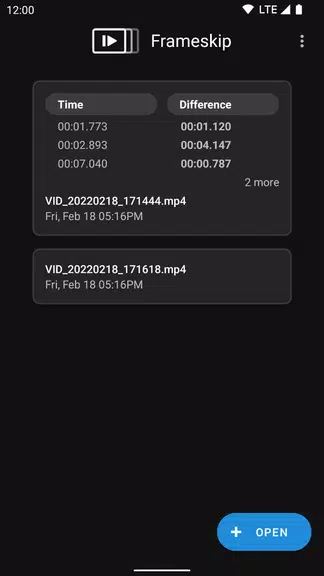
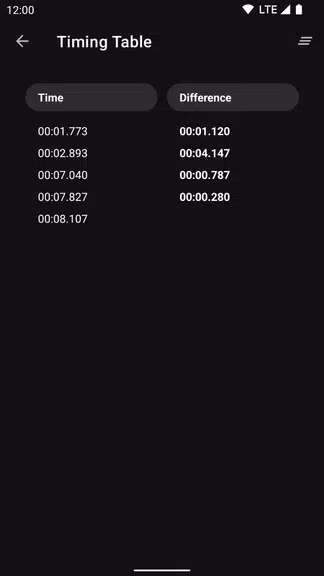
Save times into a table: Effortlessly keep track of multiple timestamps by organizing them into a table, enabling you to quickly reference specific moments in your video.

See seconds elapsed between saved timestamps: Easily calculate the time difference between your saved timestamps, making it simple to analyze the timing and intervals between frames.

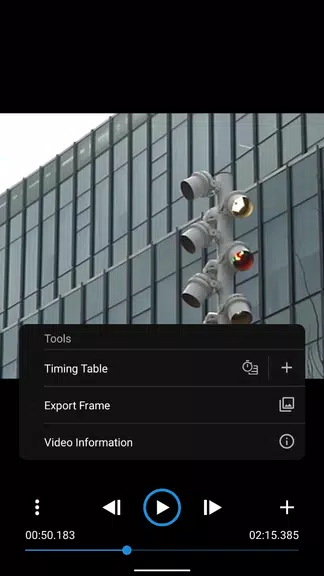
Save a frame as an image: With just a click, capture any frame as an image, making it convenient to save and share key moments from your video.

Smooth frame-by-frame playback: Experience seamless and precise navigation through each frame, ensuring a fluid viewing experience.

Video properties and information: Gain access to detailed video properties and information directly within the app, equipping you with the necessary data to enhance your understanding of the video content.

About the App

Frameskip - Video Timing Tool is a user-friendly and robust video timing tool that provides a suite of useful features such as variable playback speeds, frame saving capabilities, and detailed video information. With its commitment to being completely ad-free and devoid of In-App Purchases, Frameskip is a freely accessible tool perfect for anyone looking to analyze videos frame-by-frame. Download Frameskip now to transform your video viewing and analysis experience!
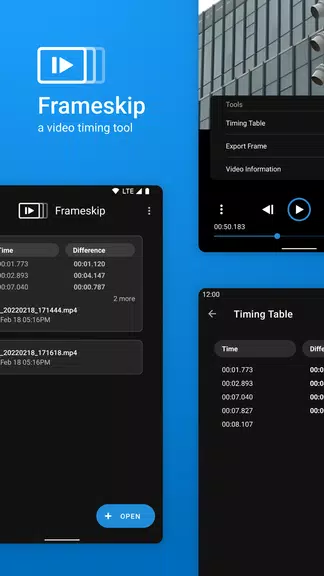
Frameskip - Video Timing Tool Screenshot 0
Frameskip - Video Timing Tool Screenshot 1
Frameskip - Video Timing Tool Screenshot 2
Frameskip - Video Timing Tool Screenshot 3
Reviews Post Comments
Trending Apps More +
2.0.0 / 16.1 MB
1.51 / 34.00M
6.2.4 / 11.30M
3.3.4.102475 / 79.60M
Latest Apps More +
Dive into the vibrant world of Asian manga with مانجا اون لاين, a sleek mobile app designed for ultimate reading convenience. Enjoy seamless manga access with offline chapter downloads, effortless image saving from any chapter, and real-time notific
Lifestyle | 65.30M
Credible Care is the essential tool for behavioral health organizations working within the community. While most healthcare software is built for office tasks, this app enables you to collect reliable data directly at the point of care—even without
Lifestyle | 13.30M
Prepare, safeguard, and recover using the FEMA App—your essential tool for storm and disaster safety. Build an emergency communication plan, receive live weather alerts, and find the nearest shelters all in one place. Access eligibility details for
Tools | 22.1 MB
The Huawei HiLink app allows you to manage your HiLink devices anytime, anywhere.Huawei HiLink combines the features of the Huawei Mobile WiFi and RuMate apps, delivering a more unified and streamlined management experience.As a central management ap
News & Magazines | 23.00M
Explore the world of manga with Azuki – Manga Reader App, your go-to platform for all things manga. Access thousands of chapters, from exclusive series to fan favorites like Attack on Titan and Fire Force, offering a rich library for every reader. E
Productivity | 28.5 MB
Send any file type, anywhere you wantSend Anywhere: Simple, fast, and unlimited file sharing▶ Key Features• Share files of any type while preserving original quality• Use a one-time 6-digit key for quick and simple transfers• Wi-Fi Direct: transfer f