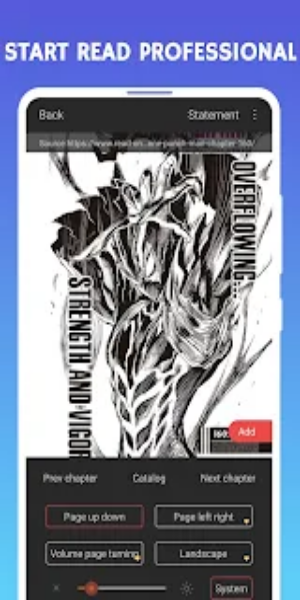

Manga Fox is a robust browser with a powerful reader mode for manga, manhwa, and comic websites. It delivers a fast, secure, and intelligent mobile browsing experience, offering easy navigation, extensive customization, and advanced privacy features to keep your online activity safe.

Features
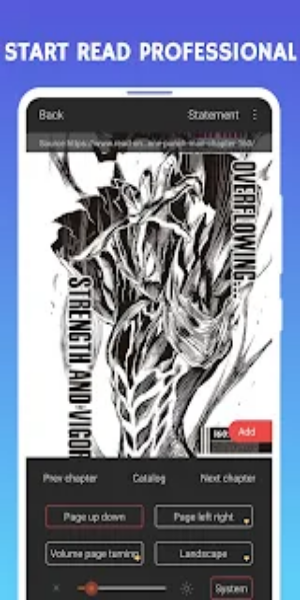
Read Mode: Enjoy a dedicated comic mode across the entire web, engineered to perfectly support continuous image reading on comic and picture-based sites. Lose yourself in seamless viewing without the interruption of flipping pages.
Privacy Mode: Your online activity stays private. Browse incognito, encrypt, and hide visited sites to keep your personal data safe from any unwanted attention.
Ad Blocking: Browse free of clutter. Manga Fox automatically blocks intrusive ads—including small banners, pop-ups, and sponsored content—so you can read webpages with zero distractions.
Advertising Sign: Take control of your screen with a powerful ad-tagging feature. Manually mark annoying ads to remove them from future browsing and maintain a cleaner reading space.
Smart Toolbar: Get instant access to your go-to websites, bookmarks, and history. Simply tap the Smart Toolbar to jump to favorite sites without typing, boosting your efficiency.
Privacy Protection: Keep your browsing habits private with Do Not Track support. This prevents advertisers from collecting your data, putting your anonymity and privacy first.
Extremely Simple: Effortlessly arrange and customize preset sites to match your routine. Reorder them, tailor the information panel, and even pick your preferred search engine for a truly personal browsing setup.
Fast Browsing: Enjoy quick page loads and butter‑smooth scrolling. Manga Fox minimizes memory use and speeds up navigation for a seamless web experience.
Fast Speed and Data Saving: Save bandwidth by blocking unnecessary content and enabling a picture‑free reading mode. Browse effortlessly even on limited data plans.
How to Use
1. Activate Read Mode: Turn on the specialized Read Mode for seamless, continuous picture viewing on manga and comic sites. Say goodbye to page breaks and enjoy uninterrupted reading.
2. Enable Privacy Mode: Protect your privacy by switching on Privacy Mode. Browse incognito and encrypt visited sites to prevent tracking.
3. Utilize Ad Blocking: Head to the Ad Blocking settings to automatically block invasive ads. Customize what gets blocked for a distraction‑free session.
4. Manage Advertising: Use the Advertising Sign tool to take charge. Mark unwanted ads manually to wipe them from your view and keep your browsing clean.
5. Navigate with Smart Toolbar: Access your top sites, bookmarks, and history in one tap with the Smart Toolbar. Navigate faster without typing anything.
6. Enhance Privacy: Strengthen your privacy by enabling Do Not Track. This stops advertisers from gathering your browsing data, keeping you anonymous.
7. Customize Settings: Make Manga Fox yours. Rearrange preset sites, tweak the information section, and customize your search engine to fit your style.
8. Optimize Speed and Data Usage: Experience faster browsing with optimized loading and smooth scrolling. Turn on data‑saver features and picture‑free mode to browse smarter on limited data.

Conclusion:
Manga Fox - Manga Comic Reader is the go‑to tool for manga fans who want a smooth, secure, and personalized browsing journey. Its standout features—including Read Mode for endless image viewing, strong privacy tools like incognito browsing and ad blocking, and the handy Smart Toolbar for quick navigation—deliver a custom experience for every user. Whether you’re exploring new genres or fine‑tuning your settings, Manga Fox lets you dive into manga and comics effortlessly. Join readers worldwide and discover the convenience and versatility of Manga Fox—your portal to the vast universe of manga comics.