Home News Disable Mouse Acceleration in Marvel Rivals for Improved Gameplay

Disable Mouse Acceleration in Marvel Rivals for Improved Gameplay

Author : Emily Update:Feb 11,2025

Mouse acceleration significantly hinders performance in shooters, and Marvel Rivals is no exception. The game defaults to mouse acceleration with no in-game option to disable it. Here's how to manually disable it:

How to Disable Mouse Acceleration in Marvel Rivals
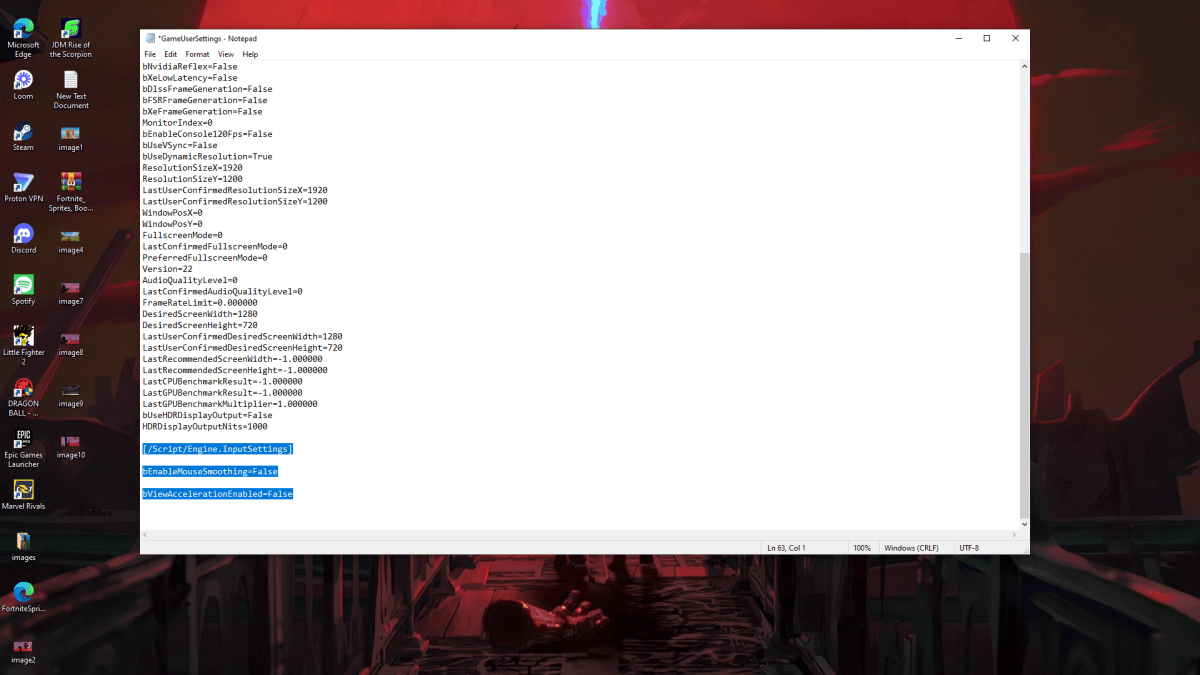
A screenshot of Marvel Rivals Settings demonstrating how to turn off mouse acceleration

Because the game lacks an in-game setting, you must modify the game's configuration file. Follow these steps:

  1. Press Windows key + R, type %localappdata%, and press Enter.
  2. Locate the "Marvel" folder, then navigate to "MarvelSavedConfigWindows".
  3. Open "GameUserSettings.ini" using Notepad (or a similar text editor).
  4. Add the following lines to the end of the file:
[/Script/Engine.InputSettings]
bEnableMouseSmoothing=False
bViewAccelerationEnabled=False
  1. Press Ctrl + S to save, then close the file.
  2. Right-click "GameUserSettings.ini", select "Properties", check "Read-only", and click "Apply" and "OK".

This disables mouse acceleration within the game. For optimal results, also disable it in Windows:

  1. In the Windows search bar, type "Mouse" and select "Mouse settings".
  2. Click "Additional mouse options" in the upper right corner.
  3. Go to the "Pointer Options" tab.
  4. Uncheck "Enhance pointer precision".
  5. Click "Apply" and then "OK".

You've now disabled mouse acceleration in both Marvel Rivals and Windows. Enjoy improved aim and consistent sensitivity!
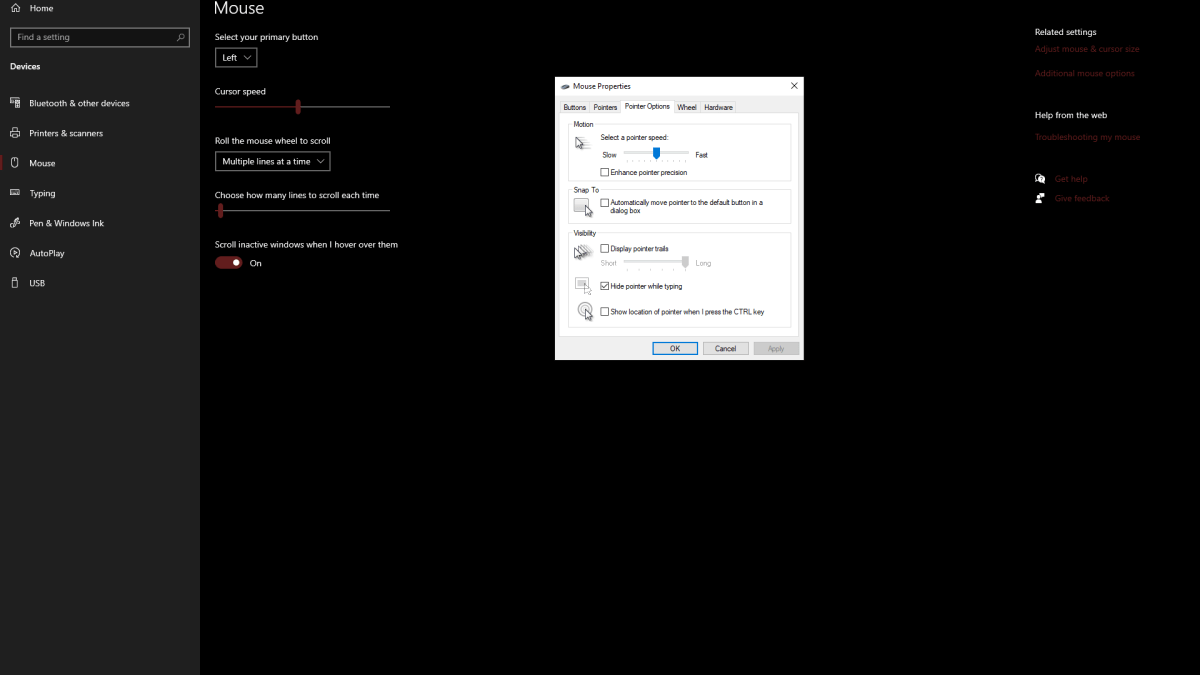
screenshot of Mouse settings in Windows

Understanding Mouse Acceleration

Mouse acceleration alters your sensitivity based on mouse movement speed. Fast movements result in high sensitivity, slow movements in low sensitivity. While convenient for general use, this is detrimental to shooters. Consistent sensitivity is crucial for building muscle memory and improving aim. Mouse acceleration prevents this by constantly changing your sensitivity.

Marvel Rivals is available now on PS5, PC, and Xbox Series X|S.

Latest Games More +
Arcade | 44.4 MB
Rise Up Smiley – The Ultimate Casual Gaming ExperienceGet ready for non-stop fun with Rise Up Smiley - the most addictive arcade challenge! Protect your cheerful smiley as it ascends through countless obstacles in this simple yet thrilling adventure.
Card | 14.90M
Take the classic Spanish card game Tute with you everywhere with Tute Offline – Card Game! Challenge intelligent bots in 2- and 4-player modes and earn points by capturing high-value cards. Play offline and feel the excitement of winning tricks usin
Simulation | 118.71M
My PlayHome Plus delivers an engaging digital dollhouse adventure where children can freely explore and create! With the mod version offering full access, players can personalize bedrooms, living areas, and bathrooms without limitations. Experience
Card | 28.70M
Experience the timeless fun of FreeCell - Classic Card Game on your device! This beloved card game, enjoyed by millions worldwide, faithfully recreates the excitement of the classic PC version with mobile-friendly adaptations for players of all ages
Strategy | 219.4 MB
Embark on a strategic defense adventure in Eldorado to discover the legendary golden city of 'Eldorado'!The beloved TV sensation "Eldorado" is now available on mobile with Eldorado M.This strategic defense game follows the adventures of Ace and frien
Action | 49.70M
Dive into Pirate Treasure: Match 3 Tiles, an engaging puzzle adventure where you swap tiles to form matches and discover hidden riches. Explore a lively pirate-themed universe featuring stunning visuals, progressively difficult stages, and special b