Tracking Your Fortnite Spending: A Comprehensive Guide
Want to know exactly how much you've spent on Fortnite skins and V-Bucks? It's easier than you think, and knowing your spending habits is crucial to avoid financial surprises. This guide outlines two effective methods to check your Fortnite expenditure.
Why Track Spending?
While small purchases may seem insignificant, they quickly accumulate. Think of the woman who unknowingly spent nearly $800 on Candy Crush in three months – a stark reminder of how easily in-app purchases can escalate. Let's explore how to avoid a similar situation with Fortnite.
Method 1: Checking Your Epic Games Store Account
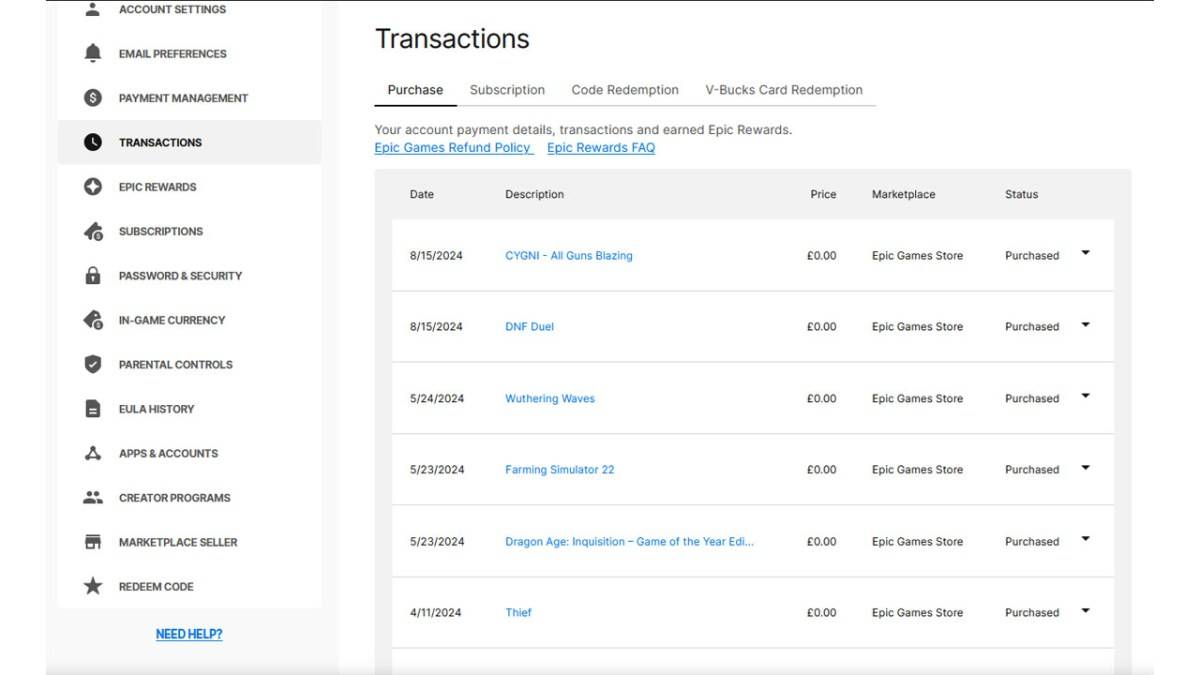
All V-Buck purchases are recorded in your Epic Games Store account, regardless of your platform or payment method. Follow these steps:
- Visit the Epic Games Store website and log in.
- Click your username in the top right corner.
- Select "Account," then "Transactions."
- On the "Purchase" tab, scroll through your transaction history, clicking "Show More" as needed.
- Identify entries showing "5,000 V-Bucks" (or similar amounts) along with their associated dollar value.
- Manually sum the V-Bucks and currency amounts to determine your total spending.
Important Notes: This method requires careful review. Free game claims will appear as transactions, and V-Buck card redemptions may not show a dollar amount.
Method 2: Utilizing Fortnite.gg
Fortnite.gg offers an alternative approach, though it requires manual input:
- Go to Fortnite.gg and sign in (or create an account).
- Navigate to "My Locker."
- Manually add each purchased outfit and cosmetic item by clicking on it and then "+ Locker." You can also search for items.
- Your locker will display the total V-Buck value of your acquired cosmetics.
- Use a V-Buck to dollar converter (easily found online) to estimate your total spending.
Neither method is completely foolproof, but they provide a reasonable estimate of your Fortnite spending. Stay informed, and game responsibly!
Fortnite is playable on numerous platforms, including Meta Quest 2 and 3.