Quick Links
Neighbors is a captivating game on the Roblox platform that lets you engage in dynamic communication and interaction with other players. It functions much like a chat roulette, but with the added twist of visiting other users in their in-game homes. By using Neighbors codes, you can unlock credits and skins that help you craft your unique style, making you a welcome guest in every virtual house. This is crucial because, for some reason, many players tend to shy away from those sporting the "noob" skin.
Updated January 7, 2025, by Artur Novichenko: Keep an eye on this guide for the latest freebies. Check back frequently for more updates.
All Neighbors Codes
 First impressions matter, and in Neighbors, they're formed instantly based on your appearance and behavior. When you meet a random player, your look is the first thing they notice. A less-than-stylish appearance might get you kicked out before you even say hello. Use these codes to enhance your style and ensure a warm welcome from the start.
All Working Neighbors Codes
- ILOVEBOOGLE - Redeem this code to get 120 Credits.
Expired Codes
- THANKSGIVING24
- SPOOKY
- HALLOWEEN
- 50K
- 100K
- HOUSESKINS
- 200K
- LABORDAY
- BACKTOSCHOOL
- 40K
- 200MILLION
- TREASURE
- RECESS
- 20K
- HOP
- SHAMROCK
- WINTER23
- HOLIDAYCUT
- 10KMEMBERS
- 17+RELEASE
- AUTUMN2
- FRIDAY13
- ILOVEBOOGLE
- LABORDAY2023
- NEIGHBORS50MILLION
- PUBLICTEST1
- THANKSGIVING23
- WOOSH
How to Redeem Neighbors Codes
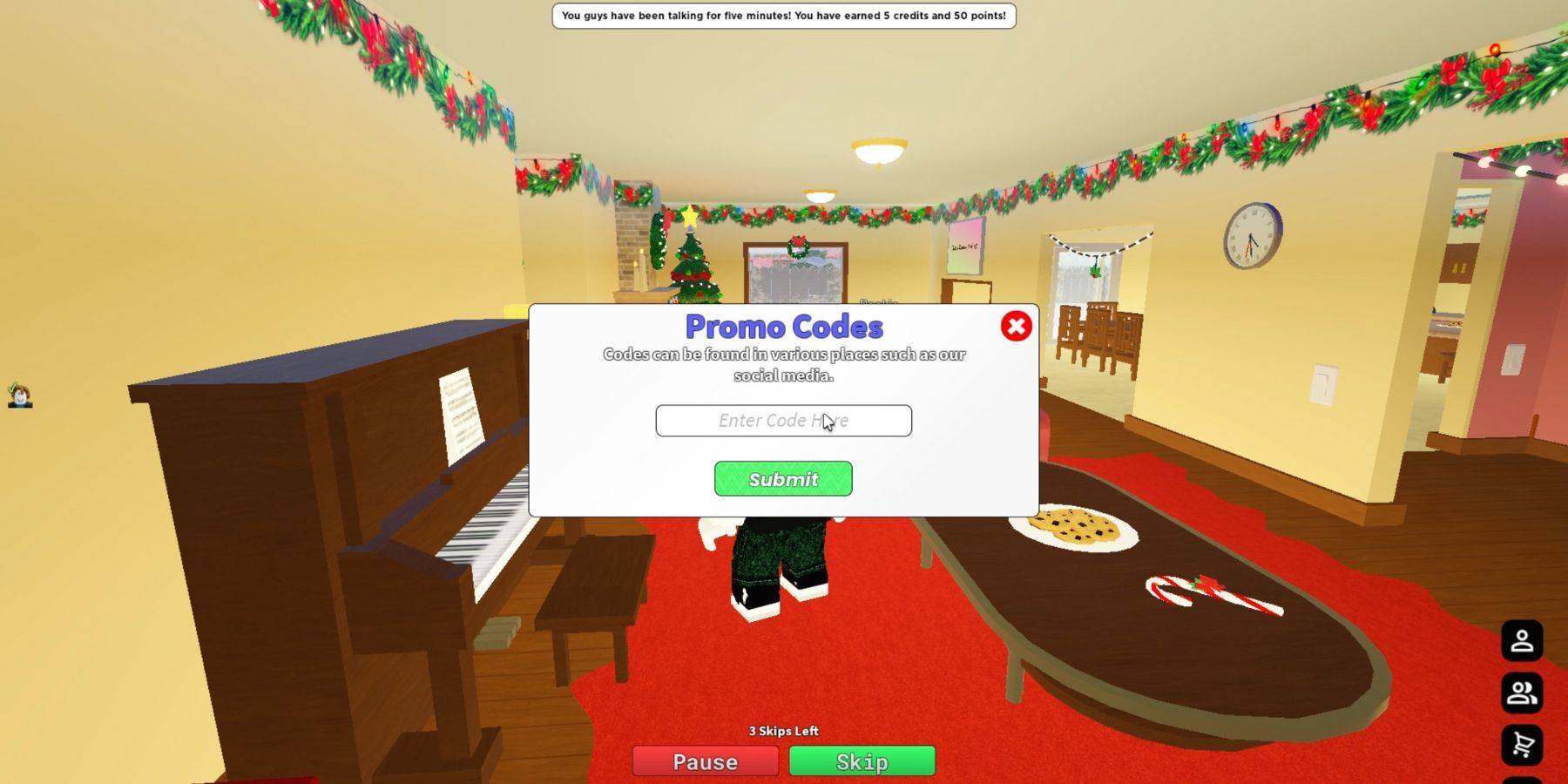 Redeeming codes in Neighbors is a breeze, unlike some other Roblox games. You can do it right after launching the game. Follow these simple steps to claim your rewards:
- Start by launching Neighbors.
- Look at the upper-right corner of your screen, where you'll see several buttons with different icons.
- Find and click the button with the key icon.
- This action will open a new menu where you can redeem codes. You'll see an input field and a Submit button.
- Choose the code you want to redeem, and it's best to copy and paste it to avoid any typos.
- Once the code is in the field, hit the Submit button to claim your reward.
- A successful redemption will be confirmed by a green notification at the top of your screen.
If you don't see this notification, the code may have expired. In such cases, you won't be able to claim the associated rewards. To avoid missing out, redeem active codes as soon as possible, not just in Neighbors, but in all your favorite Roblox games.