Screen Master is a versatile and powerful app designed to help you easily capture, edit, and annotate screenshots on your mobile device. Whether you're sharing important information, creating tutorials, or saving content for later, Screen Master provides a simple, yet comprehensive solution for all your screen capture needs. With its intuitive interface, customizable settings, and robust editing tools, Screen Master is the perfect tool for professionals, students, and everyday users alike.
Features of Screen Master:
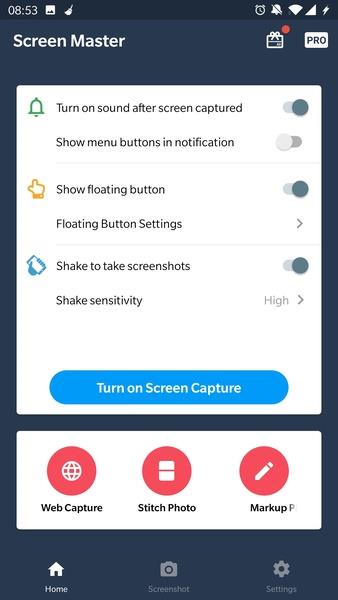
Easy to Take Screenshots: Screen Master eliminates the hassle of pressing multiple buttons simultaneously to capture screenshots. With just a tap on a dot or a simple shake of the device, you can effortlessly capture any screen content.
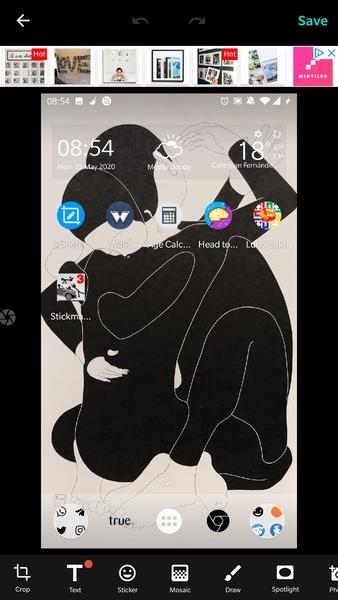
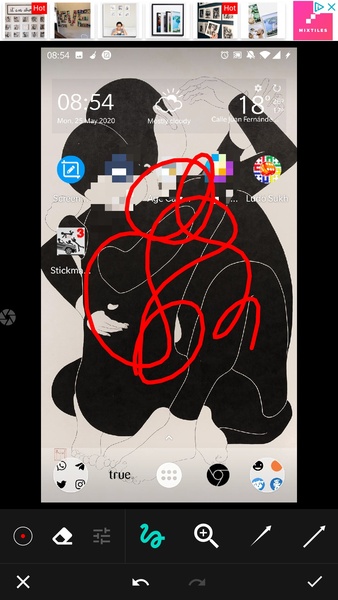
Extensive Image Editing Features: This app goes beyond basic screenshot capabilities by providing a wide range of image editing tools. Users can pixelate sensitive information, highlight important details, draw on the screen, add arrows or stickers, and even incorporate images from their gallery onto the screenshot.
Privacy Protection: With Screen Master, users have the ability to protect an individual's privacy by easily hiding their face or any other confidential information present in the screenshot. This feature is particularly useful for sharing screenshots while maintaining the anonymity of those involved.
Demonstrative Purposes: Whether you're creating a tutorial, presentation, or showcasing a specific feature, Screen Master allows you to seamlessly highlight or point out certain parts of the image. This added functionality enhances communication and ensures that your audience clearly understands the focus of your demonstration.
Tips for Users:
Customize Sensitivity Level: If you choose to capture screenshots by shaking the device, make sure to adjust the sensitivity level that activates the screenshot. Experiment with different settings to find the perfect balance between convenience and accidental triggers.
Explore Image Editing Tools: Take full advantage of Screen Master's image editing features. Experiment with pixelation, highlighting, drawing, and adding stickers or arrows to make your screenshots more informative and visually appealing.
Utilize Gallery Integration: Make use of the option to add images from your gallery onto the screenshot. This allows you to combine multiple visuals or incorporate pre-existing content, enhancing the overall impact and message of your screenshot.
⭐ Capture Screenshots With Ease
Screen Master makes it incredibly easy to capture screenshots on your device. Whether you're capturing a full webpage, a single app screen, or a specific area of your screen, the app gives you full control. With just a tap, you can take high-quality screenshots without needing complex button combinations or external tools.
⭐ Floating Button For Instant Captures
For added convenience, Screen Master offers a floating button feature that allows you to take screenshots instantly, no matter what app or screen you're using. The floating button can be positioned anywhere on your screen for quick access, ensuring that you never miss a moment that needs capturing.
⭐ Scrollable Screenshots For Full Webpages
One of Screen Master's standout features is its ability to capture scrollable screenshots, making it easy to save entire webpages or long conversations without taking multiple screenshots. The app seamlessly stitches together long pages, creating a single, continuous image for easy viewing and sharing.
⭐ Powerful Image Editing And Annotation Tools
Once you've captured your screenshot, Screen Master provides a range of editing and annotation tools to enhance your images. You can crop, resize, and rotate your screenshots with ease. The app also offers text annotation, drawing tools, and shapes like arrows and rectangles to highlight important areas. Whether you're adding notes to a tutorial or marking up a presentation, Screen Master's editing features make it simple and effective.
⭐ Blur Sensitive Information
Need to share a screenshot but want to protect sensitive information? Screen Master allows you to blur out parts of your screenshot to maintain privacy. This feature is ideal for sharing content on social media, messaging apps, or work platforms without exposing personal or confidential details.
▶ What's New in the Latest Version 1.8.0.20
Last updated on Sep 10, 2024
Minor bug fixes and improvements. Install or update to the newest version to check it out!