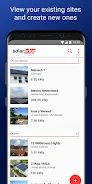
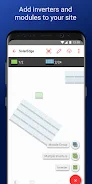
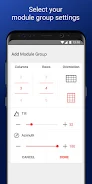
SolarEdge Site Mapper is a user-friendly app designed to simplify the process of registering and mapping new solar systems for SolarEdge installers. This app seamlessly integrates with the SolarEdge cloud-based monitoring platform, offering a range of features that streamline the installation process.
Key Features:
- Streamlined Registration: Effortlessly register new systems by mapping their physical layout directly within the SolarEdge monitoring platform.
- System Physical Layout Editing: Create, edit, and verify the system's physical layout on-site, ensuring accuracy and clarity.
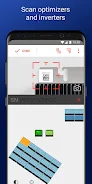
- Optimizer Serial Number Scanning: Quickly scan and assign SolarEdge power optimizer serial numbers to their correct locations using the mobile device's camera or a Bluetooth-connected scanner.
- Offline Functionality: Work offline and store data locally on your mobile device. Data synchronizes with the monitoring platform once a data connection is available.
- Integration with SolarEdge Monitoring Platform: Enjoy seamless communication and data synchronization between the app and the SolarEdge monitoring platform.
- User-Friendly Interface: Navigate and use the app with ease thanks to its intuitive and simple interface.
Benefits:
The SolarEdge Site Mapper app empowers SolarEdge installers with a powerful tool that:
- Streamlines Registration: Simplifies the process of registering new systems.
- Enhances Accuracy: Ensures accurate mapping and management of solar installations.
- Improves Efficiency: Saves time and effort during the installation process.
- Offers Flexibility: Allows installers to work offline and synchronize data later.
Conclusion:
The SolarEdge Site Mapper app is an essential tool for SolarEdge installers, providing a user-friendly and efficient way to register and map new systems. Its comprehensive features, offline capabilities, and seamless integration with the SolarEdge monitoring platform make it a valuable asset for any installer. Download the SolarEdge Site Mapper app today and experience a streamlined installation process.