
Get ready for a revolutionary full-body tracking experience with Viso FBT! Say goodbye to bulky physical trackers. You can now fully immerse yourself in VR using just your smartphone camera. Best of all, this innovative solution is entirely free and remarkably easy to use, making it accessible to every VR enthusiast. Step into the future of VR interaction with Viso FBT!
Design and User Experience:
**Intuitive Design**
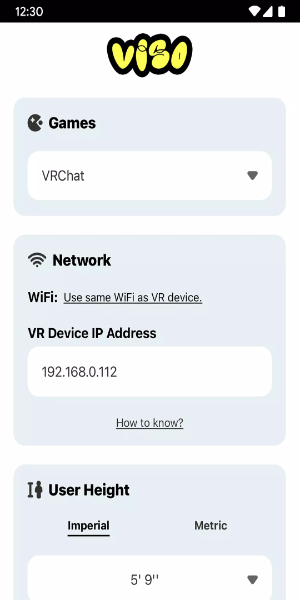
Designed with the user in mind, Viso FBT simplifies full-body tracking setup and operation in virtual reality. The app smartly repurposes your smartphone camera as a motion sensor, removing the need for extra hardware. Its straightforward interface guides you through calibration smoothly for a truly hassle-free setup.
**Seamless Integration**
Viso FBT integrates effortlessly with leading VR platforms, including VRChat on both Quest and SteamVR. It harnesses your phone’s camera to detect and translate your body’s subtle motions into the virtual world. This ensures broad compatibility across various VR setups, offering users unmatched flexibility and convenience.
**Real-Time Motion Capture**
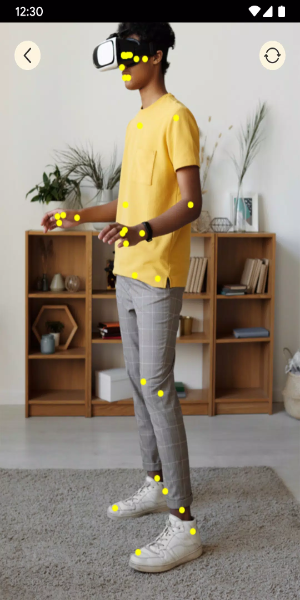
Experience real-time motion capture redefined with Viso FBT. The app delivers precise tracking from your elbows to your feet, enabling accurate avatar animation in VR. Whether dancing, gesturing, or walking, your movements are faithfully mirrored, deepening immersion and interaction in the virtual environment.
**User-Friendly Interface**
Navigating Viso FBT is intuitive and easy. The clear, accessible interface provides step-by-step guidance for calibration and setup. You can quickly adjust settings to fine-tune your VR experience, ensuring full-body tracking integrates seamlessly into your virtual adventures.
**Enhanced Immersion**
Viso FBT enriches your VR immersion by enabling more natural interaction within digital spaces. Using your phone’s camera for motion tracking, the app closes the gap between the physical and virtual worlds. It delivers a deeply compelling and immersive experience accessible to all users, regardless of their setup or skill level.
Powerful Functions of Viso FBT:
**Precise Motion Tracking**
Viso FBT delivers excellent motion tracking powered by just your smartphone camera. It captures movement from your elbows to your feet and converts it into accurate avatar animations in environments like VRChat on both Quest and SteamVR. This feature provides a smooth, responsive VR experience without any extra physical equipment.
**Real-Time Avatar Animations**
See your avatar move with you in real time using Viso FBT. The app translates your gestures, poses, and locomotion directly into the virtual world, heightening immersion and interactivity. Whether dancing, walking, or handling virtual objects, your avatar responds naturally for a more lifelike and engaging experience.
**User-Friendly Setup**
Viso FBT features a user-friendly setup that makes full-body tracking configuration simple. Calibrate your phone’s camera for optimal motion capture quickly and easily. The app gives clear, guided instructions so even VR newcomers can get up and running in no time.
**Multi-Platform Compatibility**
Enjoy absolute flexibility with Viso FBT's multi-platform compatibility. It works with popular platforms like VRChat on both Quest and SteamVR, appealing to a wide VR audience. Whether you use a standalone headset or a PC-based setup, Viso FBT integrates smoothly, letting you enjoy full-body tracking across different systems.
**Free and Accessible**
Viso FBT is completely free, opening up advanced tracking to a broad community of VR users. It eliminates the cost of expensive physical trackers, providing an affordable way to enjoy immersive full-body VR. With Viso FBT, everyone can experience the benefits of cutting-edge motion capture technology.
How to Install:
- Download the APK: Get the APK file from a trusted source, 40407.com.
- Enable Unknown Sources: Open your device's settings, go to security, and allow installation from unknown sources.
- Install the APK: Locate the downloaded APK file and follow the on-screen prompts to install.
- Launch the App: Open the app and start enjoying it.