Home Apps Tools WiFi Tethering: Share Internet
WiFi Tethering: Share Internet

WiFi Tethering: Share Internet

  • Category : Tools
  • Size : 10.00M
  • Version : v1.5
4.1
Download
Download
Application Description

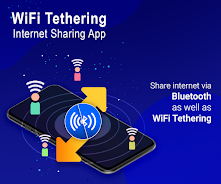
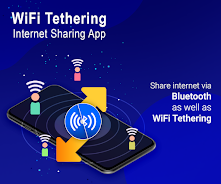
The WiFi Tethering: Share Internet app is a convenient tool for sharing your internet connection wirelessly with other devices using Bluetooth or Wi-Fi tethering. It simplifies the process of connecting and managing multiple devices, allowing you to share your internet connection without the need for cables.

Here's how it works:

Bluetooth Tethering:

  • Turn on Bluetooth tethering by clicking on the option within the app.
  • Ensure Bluetooth is enabled on your device, as disabling it will also disable Bluetooth tethering.
  • Other devices can then connect to your internet connection through Bluetooth tethering by selecting your device from the list of available connections.

Wi-Fi Tethering:

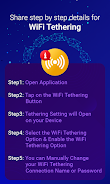
  • Turn on Wi-Fi tethering by clicking on the option within the app.
  • You can manually change the name (SSID) and password of your Wi-Fi tethering connection for added security and personalization.
  • Other devices can connect to your internet connection through Wi-Fi tethering by selecting your network from the list of available Wi-Fi networks.

Key Features:

  • Share Internet on Multiple Devices: Easily share your internet connection with multiple devices simultaneously, making it ideal for individuals or groups.
  • No Cables Required: Enjoy the freedom of wireless internet sharing without the hassle of cables.
  • Easy Connection Management: Effortlessly connect and manage multiple devices, making it easy to switch between devices or control access to the shared internet connection.
  • Bluetooth and Wi-Fi Tethering: Choose the most suitable method for sharing your internet connection based on your needs and preferences.
  • Customization Options: Personalize your Wi-Fi tethering connection with a custom name and password for added security and control.
  • User-Friendly Interface: The app's intuitive design makes it easy for users of all technical levels to enable, control, and manage the Bluetooth or Wi-Fi tethering feature.
WiFi Tethering: Share Internet Screenshot 0
WiFi Tethering: Share Internet Screenshot 1
WiFi Tethering: Share Internet Screenshot 2
WiFi Tethering: Share Internet Screenshot 3
Reviews Post Comments
Trending Apps More +
2.0.0 / 16.1 MB
1.51 / 34.00M
6.2.4 / 11.30M
1.4.85 / 99 MB
Latest Apps More +
Communication | 4.00M
Effortlessly stay connected to all your email accounts with this versatile Android app, Email for Yahoo Mail Plus. Enjoy fast, free access to services like Gmail, Yahoo, Hotmail, and more, saving time by managing all your messages in one convenient
Communication | 20.20M
Saudi Arabia Dating is your premier platform for Saudi singles seeking meaningful connections. Tailored specifically for the Saudi dating scene, our app helps you find compatible partners through advanced matching features while respecting local cult
Lifestyle | 6.30M
Effortlessly find your way with GPS Live Map Navigation - Smart Traveler. This comprehensive app blends smart map navigation, a GPS compass, and a digital speedometer to get you to your destination quickly and smoothly. Never get lost again thanks t
Tools | 11.30M
VPN - Unlimited Fast VPN Proxy é o seu bilhete para serviços ilimitados e rápidos de VPN proxy gratuitos! Esteja você na escola ou em uma rede Wi-Fi pública, este aplicativo ajuda você a bypass firewalls e acessar sites bloqueados com facilidade. Co
House & Home | 10.8 MB
Hader provides streamlined hourly recruitment solutionsHader connects you with top-tier professionals trained in home services, including cleaning, cooking, elderly care, and more – available through flexible hourly packages or customized service pla
K-POP (Korean pop music) is a musical genre that began in South Korea. It blends diverse styles such as pop, hip-hop, R&B, and electronic dance music. Known for its infectious tunes, energetic dance routines, and striking music videos. Key Features